Getting a Lock Code
Licences are locked to a “finger print” of the host machine. To create the licence a lock code is first required.
- Go to Licence Administrator [File-Utilities] to start the Cadcorp SIS Licence Administrator 8.0.
- Go to the Locking Info tab.
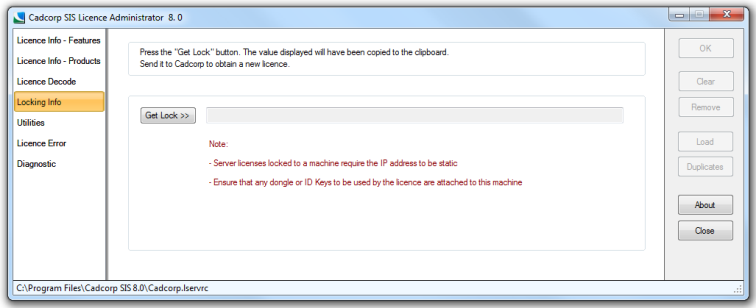
- Press the Get Lock button the lock code will be displayed, this must be sent to Cadcorp to obtain a new licence.
If the Lock requires that hardware be attached to the machine then a prompt is given.
- If the required hardware is attached, press Yes. The Lock code will appear in the Lock Code field. This value needs to be emailed to Cadcorp to create valid licences for the machine.
Send comments on this topic.
Click to return to www.cadcorp.com
© Copyright 2000-2017 Computer Aided Development Corporation Limited (Cadcorp).