 Search Tips
Generalise
Generalise generalises geometry using the Douglas-Peucker algorithm.
The Douglas-Peucker algorithm simplifies LineString items while preserving symbols. The algorithm first joins the start and end vertices with a straight LineString item. It then examines the perpendicular distances of the vertices from that LineString item and based upon a specified threshold, removes vertices within the threshold limit. The simplified LineString item is then redrawn in a series of successive tests.
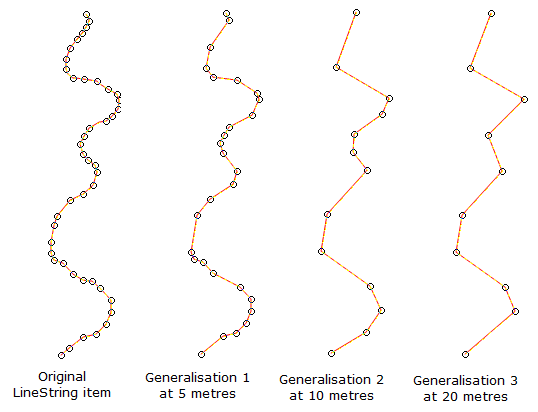
The following example shows three simple cases of LineString item generalisation resulting from different thresholds (distances) being set: the greater the threshold, the greater the simplification of the LineString item (more vertices are removed).
1. To simplify LineString items, select them and select Generalise.
| Option | Description | |
|
Tolerance |
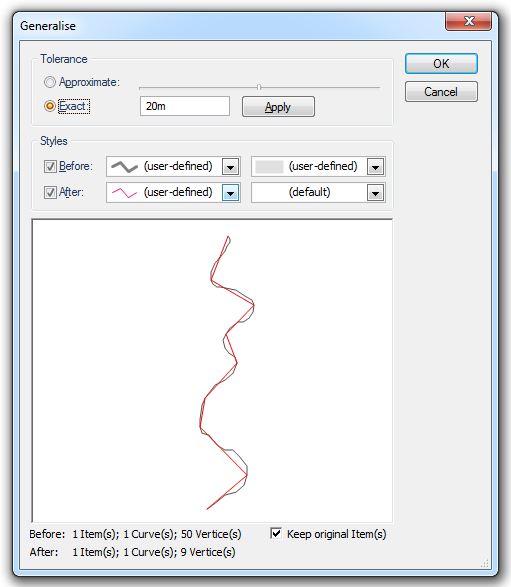
Select Approximate and use the slider to choose an approximate tolerance for the operation. Select Exact to enter an exact tolerance value for the operation. |
|
|
Styles |
Before: The first drop-down box selects the pen used to draw the pre-operation item(s). The first drop-down box selects the brush used to draw the pre-operation item(s). After: The first drop-down box selects the pen used to draw the post-operation item(s). The first drop-down box selects the brush used to draw the post-operation item(s). |
|
|
Preview pane |
Shows the pre- and post-operation item(s) overlaid. Before: Shows the number of vertices and other items for the pre-operation item(s). After: Shows the number of vertices and other items for the post-operation item(s). |
|
|
Keep original Item(s) |
Check the Keep original item tickbox to keep the pre-operation item(s). Uncheck the tickbox if the post-operation item(s) will replace the original item(s). |
|
2. Enter the required Tolerance and Styles settings.
3. If satisfied with the simplification seen in the preview click OK.