Turnout Model using the V1 Modeller
A turnout model simulates the turnout of appliances (based at a set of stations) in response to an appliance request set’s demands.
Output is written to a new table in the database which can then be analysed with analysis tools.  Related Topics
Click  on the toolbar.
Select V1 from the drop-down menu. V1 is the original modeller and is used as the default while modelling.
Click Options for more customised and precise modelling choices.
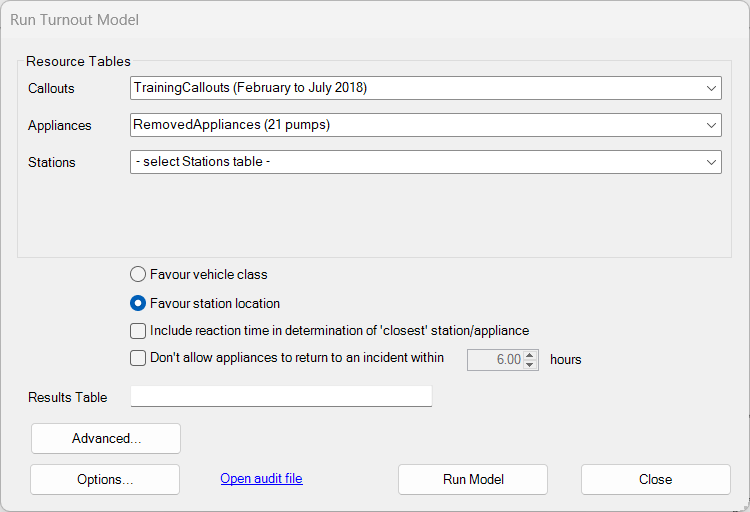
Select the relevant Appliance Request table (Callouts), the Resources table (Appliances) and the Stations table (Stations) from the drop-down lists.
Each of the three drop-down lists shows the table names for the relevant type (and associated comment in brackets.)
Favour vehicle class and Favour station location
This gives the turnout model a bias – either by:
- Vehicle class (where a specific incident demands a certain vehicle class, i.e. a specialised vehicle).
- Proximity (the nearest station location appliance) or
For example in Favour vehicle class, all stations with this particular vehicle class appliance are shown as nearer to the incident irrespective pf physical proximity.
Other stations with different vehicle class appliances may be available closer to the incident but because of Vehicle Class bias, they may be disregarded.
Include reaction time in determination of 'closest' station/appliance
Selects the nearest on the basis of the total route cost + reaction time (+ staff system).
For example in an incident X where
- Station A is 5 minutes away and appliance at A has a reaction time of 3 minutes
- Station B is 6 minutes away and appliance at B has a reaction time of 1 minute
If reaction time is not specified, the appliance at A is assigned to X. However if reaction time is enabled as a choice, the appliance at B is assigned to X.
Consider the following scenarios:
- With Include reaction time selected: If an appliance is prioritised to Fires within 10 minutes but the appliance has a reaction time of 2 minutes, the prioritisation will only be applied if the travel time was 8 minutes or less.
- Without Include reaction time selected: If an appliance is prioritised to Fires within 10 minutes and the appliance has a reaction time of 2 minutes, the prioritisation will still consider fires up to 10 minutes travel away. This means it can assign an appliance which will actually be in attendance within 12 minutes.
Note: This option is available for Turnout models only, i.e. not for Predict models.
The set up for this model is very similar to Predict Demand in Setting up the prediction model. The differences are:
- Output is sent to a table in the database rather than Excel;
- There is no option to seed appliances.
Don't allow appliances to return to an incident
Use this option to prevent the model sending the same appliance back to an incident within a specified amount of time (it is advisable to wait until a different appliance is free to do the callout).
This helps to prevent an appliance becoming its own relief crew.
Advanced Turnout Options
Select Advanced for more modelling options. Related Topics
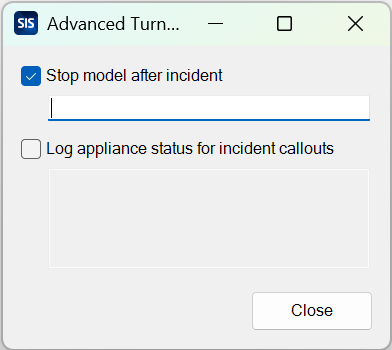
"Stop model after incident" : Use this option to define a stop point in the data. For example if you specify an incident number in the value field, the model will stop after this particular incident has been processed.
"Log appliance status for incident callouts" The option to log to the audit file the status of all appliances at the time of callout for the incidents listed.
Run model
Click the Run Model button to view the progress of the modelling task. The model generates a set of outcomes, the structure of which is compatible with Callouts in the Historic Data.
This means the simulated turnouts can be analysed exactly like Historic Data for performance to be assessed.