Overlay style
The Overlay style theme is a unique theme that applies a fixed set of styles to Items. These styles can be seen in the Maps Control Bar, for example:
.png)
To apply your required styles right-click on Overlay styles and select Properties... from the local menu:
 user settings Properties.png)
The Simple Styles dialog will be displayed showing the current overlay settings as follows:
 user settings-initial.png)
Enter a new Title, if required and select the Pen, Brush and Symbol from the drop-down boxes, for example:
 user settings.png)
Overlay styles will now display the Title, Pen, Brush and Symbol in the Maps Control Bar using the above settings:
 user settings2.png)
To see the current theme legend click on Legend in the local menu.
 user settings Legend.png)
The Theme Legend screen will be displayed:
 Legend display.png)
This screen is not editable, click the red cross to dismiss the screen.
To edit the legend click on the Legend button in the Simple Styles dialog.
The Legend dialog will be displayed, you can create a Title and Subtitle for the legend, and define how the text throughout the legend will look (Font, Height and Styles). Use Pen to define the colour of the legend text, and if you are using the Opaque style, use Brush to determine the background colour for the legend backdrop. The Legend dialog is resizeable to allow all text and samples to be previewed.
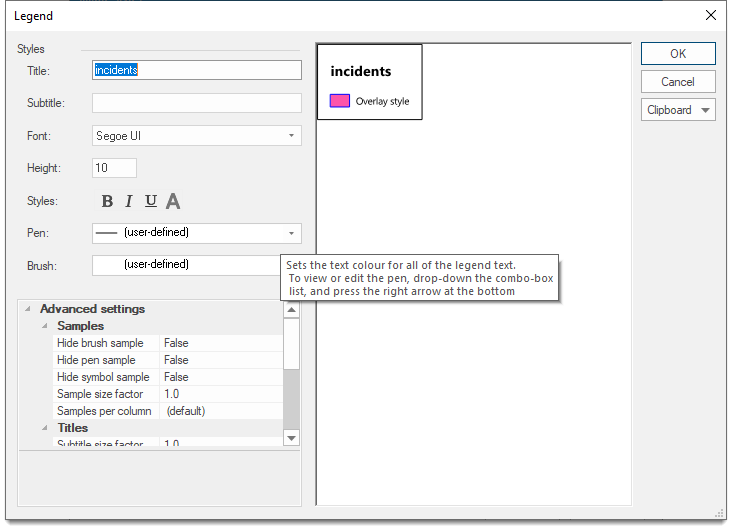
 Styles
| Option | Description | |
|
Title |
This is the title text of the legend. Title text is drawn at twice the height specified in the Height box and is always bold. |
|
|
Subtitle |
This is optional subtitle text for the legend. Subtitle text is drawn at the height specified in the Height box. |
|
|
Font |
The font to be used for all of the legend text. |
|
|
Height |
The point height used for all of the legend text, except for the Title, which is twice the height. |
|
Styles
| Option | Description | |
|
Bold/ Italic/ Underline/ A |
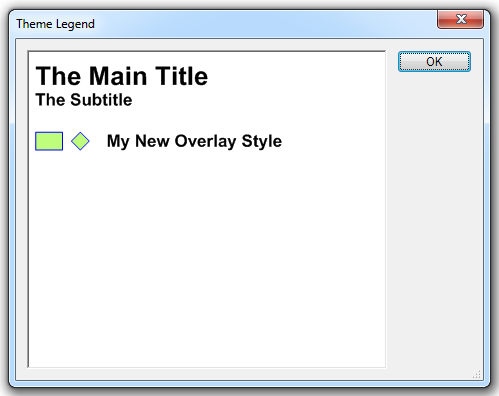
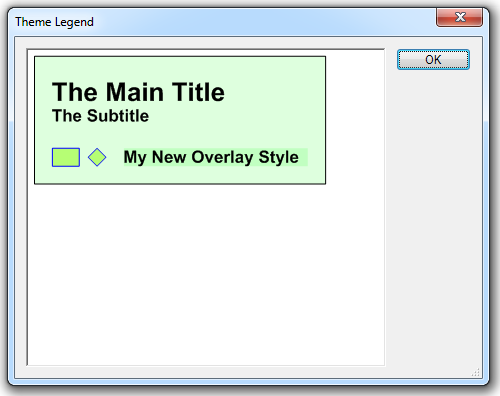
Sets all the legend text to bold/italic/underlined. Bold cannot be turned off for the Title. The A (Opaque) button sets the whole legend to opaque by filling in its background with the brush colour set in the Brush drop-down, for example: A (Opaque) off:
A (Opaque) on:
|
|
|
Pen |
Sets the text colour for all of the legend text. |
|
|
Brush |
Sets the background colour for the legend backdrop, which is only drawn if the opaque style is used. To view or edit the brush, drop-down the combo-box list, and press the right arrow at the bottom. |
|
Advanced settings
1. Samples
| Option | Description | |
|
Hide brush sample |
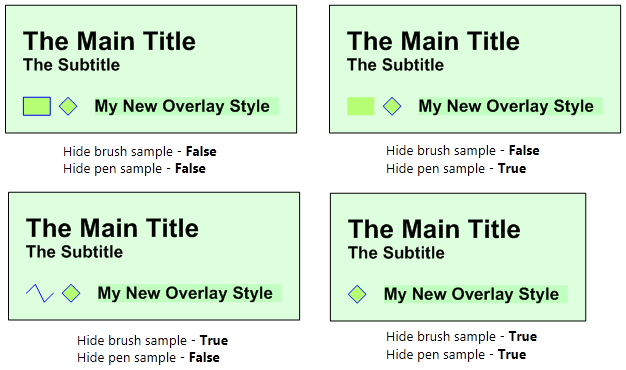
Should the brush sample in the legend be hidden? True/False. |
|
|
Hide pen sample |
Should the brush sample in the legend be hidden? True/False. The following diagrams show the effect of the Hide brush sample and Hide pen sample settings:
|
|
|
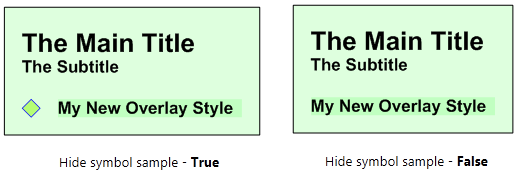
Hide symbol sample |
Should the symbol sample in the legend be hidden? True/False. The following diagram shows the effect of the Hide symbol sample settings, if a symbol has been used:
|
|
|
Sample size factor |
This is the scale factor to apply to samples, relative to the text height which does not change. |
|
|
Samples per column |
This is the number of samples shown in a column, i.e. Theme components, per legend column. |
|
 2. Titles
| Option | Description | |
|
Subtitle size factor |
This is the scale factor to apply to the subtitle text, relative to the text height. The range is 1.0 to 3.0. |
|
|
Title bold |
Should the title text be bold? True/False. |
|
|
Title size factor |
This is the scale factor to apply to the subtitle text, relative to the text height (of the subtitle text). The range is 1.0 to 3.0. |
|
3. Wrapping
| Option | Description | |
|
Wrap character |
The character at which to wrap the characters in the columns the default options are space or tab. Other characters can be entered as a wrap character, i.e. a comma "," can be typed into the wrap character text box. To remove a character from the text box, highlight the character and press Delete. Wrap character does not affect the title and subtitle. |
|
|
Wrap length |
The length at which to wrap a character string. Enter n to wrap after n characters, enter -n to wrap at exactly n characters. |
|