 Search Tips
Report IT
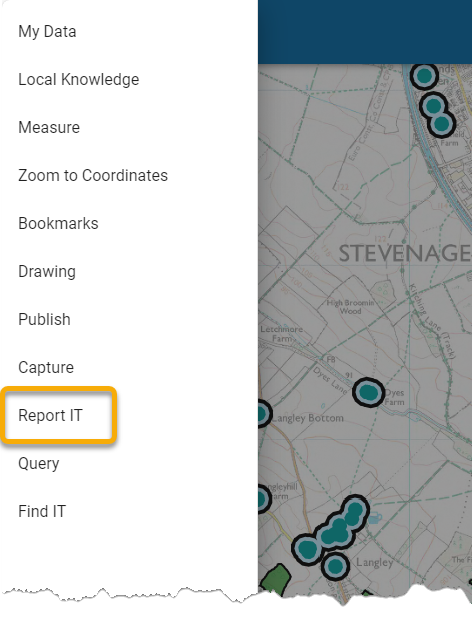
Report IT is a licensed extension to SIS WebMap and allows you to report incidents. Select Report IT from the drop-down menu.
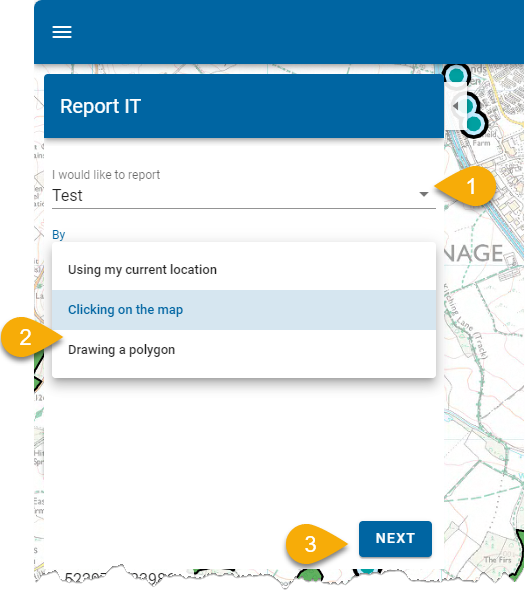
- You will see a list of incident types that can be reported; select an incident.
- Specify the incident’s location; you can either choose your current location or select it on the map.
- Click Next to provide additional details.
- Enter a date, time, contact email address and any additional comments (optional) to describe the incident you are reporting. You can also upload related images.
- Ensure you check the I am a human tickbox and click Send.
- Simply click on the map again if you would like to choose a new location; the pin will be replaced.
TIP: These fields may vary according to ReportIT configuration set by your GIS team.
Note: You can only use your current location when reporting from mobile devices.